Key Takeaway: Route optimization cuts wasted miles, reduces backtracking, and keeps technicians moving through the day on a cleaner path. When map-based planning and real-time updates work together, routes are easier to manage and more profitable to run.
Routing mistakes drain pool service margins one stop at a time. Extra turns burn fuel. A poor stop order stretches the workday. A cross-town detour makes it harder to keep customers on a dependable schedule. Because pool service repeats week after week, those mistakes compound quickly.
A route can look fine in the office and still waste money in the field. The schedule gets covered, but technicians spend too much time driving between stops instead of working at pools. That lost time shows up in fuel, wear, and the number of jobs the day can actually support. Tightening the route turns those hidden costs into visible savings.
Route optimization closes the gap between the plan and the road. It gives the office a better first draft, then makes it easier to adjust when the week changes. This guide explains how route optimization works, what to look for in routing software, and how to build a weekly plan that keeps technicians productive without creating chaos in the office.
Why Route Optimization Matters
Route optimization matters because driving is a cost center. Every extra mile between stops uses fuel, adds wear to the vehicle, and cuts into the number of pools a technician can service in a day. Tight routes save money because they reduce fuel use, limit vehicle wear, and free up time for actual service work.
That impact is easy to miss when you look at one route in isolation. A technician might finish the day and think the schedule was fine because every stop got covered. But if that day included unnecessary crisscrossing, the company still paid for it in fuel, labor, and lost capacity. A route that looks full on paper can still be inefficient if the technician spends too much of the day driving instead of working.
The problem gets worse when routes are built by account number instead of geography. One stop lands on one side of town, the next jumps across the service area, and the day keeps zigzagging from there. The work still gets done, but the route breaks into pieces. That kind of schedule creates dead time, and dead time is expensive. Tightening the route into one zone cuts that waste immediately and makes the whole day easier to finish.
Fuel prices make the waste easier to see. The U.S. average retail diesel price was $5.35 per gallon for the week of June 1, 2026, according to the EIA weekly diesel data. A week later, it was $5.21 per gallon for the week of June 8, 2026. By the week of June 22, 2026, it had fallen to $4.83 per gallon. Even with that drop, route discipline still matters because every mile carries a real operating cost.
A route problem often looks small in the office and obvious in the truck. A technician finishes a west-side cluster, then gets sent across town for one stop before returning to the same area. The detour burns fuel and breaks the rhythm of the day. Move that stop to a route already serving the west side, and the plan gets cleaner right away. The office spends less time patching gaps, and the technician spends more time at pools instead of on the road.
A simple real-world example makes the point clear. A tech finishes three stops on the west side and then has to drive across town for one outlier before coming back for the rest of the route. Nothing about the workload changed, but the day suddenly includes extra driving, a broken rhythm, and more fuel burned for the same result. Put that outlier with the route that already covers that side of town, and the route becomes smoother immediately. That is the kind of small adjustment that adds up across a week.
Clean routes also help customers. A technician moving through one zone in sequence is easier to dispatch, easier to track, and less likely to arrive late because the day keeps shifting direction. The internal planning problem becomes a service problem if the route is messy. When the route is clean, the customer feels the difference.
Beyond Fuel Costs
Route optimization affects the whole workday, not just the gas bill. When technicians spend less time driving, they can fit more service stops into the same schedule without sacrificing quality. That creates room for steadier hours and better use of the fleet.
It also reduces vehicle wear. Fewer miles mean fewer oil changes, tires, brakes, and repairs over time. Those savings are slower to notice than fuel costs, but they are real. Technicians benefit too. A route that stays within a tight area is less stressful than one that bounces back and forth across town. That kind of day is easier to manage and easier to repeat.
The ripple effect reaches the office as well. Fewer routing problems mean fewer calls to explain delays, fewer manual reschedules, and less time spent cleaning up after a bad plan. Route optimization does not just shorten drives. It makes the rest of the operation calmer.
A cleaner route also gives the team a better rhythm. Dispatch is not chasing down technicians, and technicians are not waiting on last-minute instructions. The route becomes a working plan instead of a guessing game, which is exactly what a repeat-service business needs.
How Route Optimization Works
Route optimization starts with the list of stops your technicians need to service. The software arranges those stops in the most efficient order so the team spends less time driving between jobs and more time working at each customer site.
The process is straightforward. You enter the service addresses, assign technicians, and run the optimizer. The system calculates the best stop order based on the information you give it. Then you review the route on a map, make any adjustments, and push the finished schedule to the field. The goal is not to replace your judgment. It is to give you a better first draft than manual planning ever could.
A routing system should also reflect how pool service actually works. Customers repeat on weekly cycles. Some stops take longer than others. Some addresses need to stay in a specific window. When the software respects those realities, the route does more than save miles. It supports the way the business runs.
The basic workflow stays simple: enter your stops, assign technicians, run the optimizer, review the map, and activate the schedule. That sequence keeps the office in control while removing guesswork from daily routing.
What the Optimizer Considers
A useful optimizer looks at more than distance. It should use actual road routing, not just straight-line mapping, because the shortest line on a screen is rarely the fastest drive in the real world. It should also respect customer service windows, technician work hours, and job-specific qualifications.
Geography matters too. Keeping technicians in assigned zones reduces cross-town travel and makes the schedule easier to maintain. Capacity matters as well. A route that is technically efficient on paper is not useful if it overloads one technician while another has half the work. Good routing software balances the day so the route is efficient and realistic at the same time.
That balance is the difference between a route that looks neat in the office and one that works in the field. The best software does both.
Building Your Weekly Route Plan
Weekly planning is where route optimization becomes operational instead of theoretical. A clean weekly plan gives the office a clear view of who goes where, when each job will happen, and how much work each technician is carrying. It also makes it easier to spot inefficiencies before they hit the road.
The best weekly plans start with geography, because geography is what drives fuel use and travel time. When customers cluster in the same neighborhood, they should usually be serviced by the same technician on the same day. That cuts down on backtracking and gives each route a more natural shape. From there, the job is to balance the workload and tighten the stop order so the route runs smoothly from one stop to the next.
Imagine one technician working a dense west-side neighborhood while another handles a scattered set of accounts on opposite sides of town. The two routes may carry the same number of pools, but they do not cost the same to run. The scattered route burns more fuel, takes longer to finish, and leaves less room for service quality. A better weekly plan pulls those stops into a coherent zone and keeps the route anchored around nearby customers. The technician finishes earlier, the office gets fewer complaints about timing, and the company spends less on windshield miles.
The same logic applies when a compact neighborhood route gets interrupted by two outlying stops. The technician still completes the day, but the truck crosses town twice. Move those outliers to a route that already covers that area, and the whole day gets cleaner. Small adjustments like that are where route optimization pays off. It does not just shave minutes; it protects the structure of the day.
One practical way to think about weekly planning is this: if the map does not make sense at a glance, the route will not feel smooth in the field. The office should be able to see the shape of the week before it reaches the technician’s phone.
Step-by-Step Weekly Planning
Weekly routing works best when the office follows a consistent process. Start with the map, not memory. Plot every stop so you can see where customers cluster and where the route gets stretched. That visual check usually exposes the biggest problems right away.
Once the map is clear, divide the service area into zones and assign technicians to the zones that make sense. This keeps the team in familiar territory and reduces the temptation to send a tech across town for one stray stop. After that, balance the workload with real service time in mind. A dense route with longer stops needs a different assignment than a light route with short visits.
The last part is stop order. A route can still waste time if the stops are grouped well but arranged poorly. The route should move naturally from one location to the next, without crossing the same roads over and over. When the office reviews the route before activation, it can catch those mistakes before they reach the field.
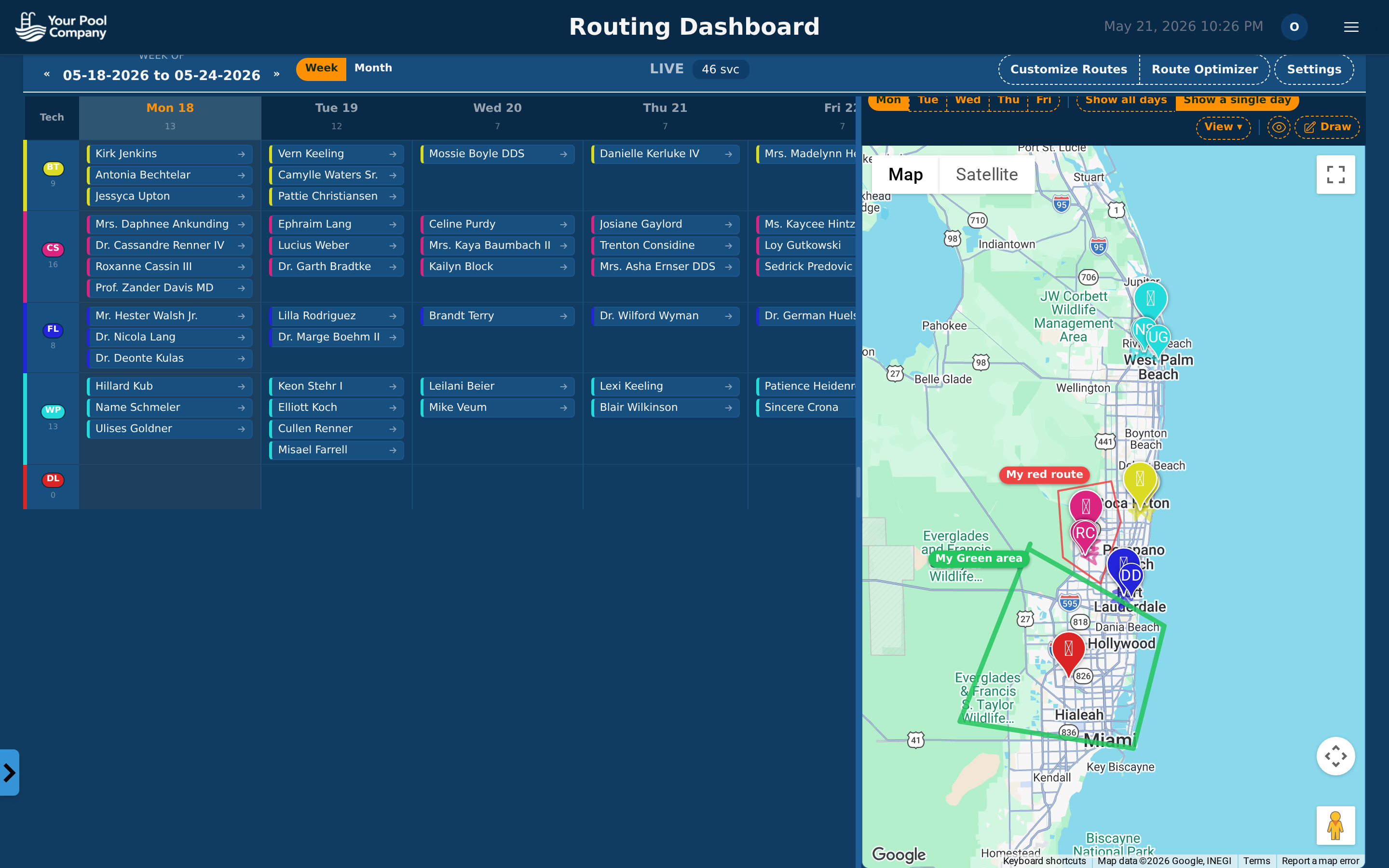 The routing dashboard shows your weekly calendar alongside an interactive map with all service stops.
That workflow turns weekly planning into a repeatable habit. The office spends less time rebuilding routes from scratch, and the field gets a cleaner schedule every time.
Step 1: Map Your Customers
Start by plotting every service location on a map. Once all the stops are visible together, patterns appear quickly. Some customers sit in tight clusters, while others are isolated and harder to fit into the day. Those clusters should guide how you build the route.
The map view matters because it shows what a list cannot. A spreadsheet can tell you where customers are in alphabetical order or by account number, but it cannot show that three stops on the same street should probably be grouped together. A map makes those decisions obvious.
Step 2: Assign Technicians by Zone
Once the customers are mapped, divide the territory into zones. Then assign technicians to those zones so they stay in familiar parts of the service area. This reduces unnecessary crossovers and prevents the “everyone goes everywhere” problem that burns fuel and wastes time.
Zone-based planning also helps with consistency. Technicians learn the neighborhoods, the customer expectations, and the route patterns in their area. That makes the work smoother and makes it easier to spot when something is off. If a route starts wandering outside its zone, you see the problem early.
Step 3: Balance Workloads
A route is only efficient if it is fair. One technician carrying far more stops than another creates a different kind of inefficiency: rushing, fatigue, and uneven service quality. Balanced workloads keep the day more predictable and make it less likely that one technician falls behind while the rest of the schedule moves on.
Workload balancing is not just about the number of stops. Some accounts take longer than others because of property size, special requests, or service requirements. The goal is to balance the real workload, not just count appointments. When the routes are even, the team works more consistently and the office has fewer surprises.
Step 4: Optimize Stop Order
After the route is assigned, the software should arrange the stops so the technician does not drive past one location only to circle back later. That sounds basic, but it is where many manual routes fail. A small backtrack repeated across an entire day adds up fast.
Automatic stop-order optimization handles this part better than a whiteboard or a handwritten sheet. The software looks at the route as a whole and orders the stops to reduce wasted motion. The result is a cleaner path and fewer miles between jobs.
Step 5: Review and Adjust
No optimizer should run without review. The map view lets you catch odd routing choices before they reach the field. Maybe a technician is crossing a highway unnecessarily. Maybe one stop belongs on another day. Maybe two close accounts were split between different routes when they should be together.
That final review is where local knowledge still matters. Software can calculate a route quickly, but your team knows the customer history, the service expectations, and the realities of the territory. The best routes come from combining both.
Handling Schedule Changes
Pool service routes change all the time. Customers cancel. New accounts come online. Weather delays part of the day. Equipment issues create detours. A routing system has to absorb those changes without turning the office into a call center.
The key is real-time coordination. When the schedule changes in the office, the field needs to see it right away. If the technician still works from an old printout or a stale spreadsheet, the whole route breaks down. A good system updates the plan instantly so everyone is looking at the same schedule.
When fuel prices are moving too, the cost of a bad reroute is easier to feel. A truck that gets sent across town for a stop that could have been grouped earlier wastes both time and diesel. With the U.S. average diesel price at $4.83 per gallon for the week of June 22, 2026, those detours deserve immediate attention, not an end-of-week fix.
What Should Happen When a Customer Cancels
When a customer cancels, the stop should drop out of the route immediately. The remaining stops should then reorder automatically if the route is optimized. That keeps the technician moving efficiently instead of leaving a hole in the middle of the day.
The other benefit is clarity. The technician does not need a phone call to explain what changed. The app reflects the new schedule, so the field team can keep moving.
Adding a Stop Mid-Day
Mid-day additions are common in pool service. A new customer may need to start immediately. A repair call may need to be added before the route ends. In those cases, the office should be able to insert the stop and push the details to the technician’s phone right away.
That update needs more than an address. It should include the gate code, service notes, and any other details the technician needs to complete the visit without calling back to the office. The less back-and-forth required, the smoother the day runs.
The Value of Real-Time Updates
Real-time updates make route changes manageable. Without them, every schedule change becomes a chain of phone calls, texts, and verbal confirmations. That might work with two trucks. It breaks down fast as the company grows.
Once the field team starts relying on live schedule sync, the office gains control over the day without slowing anyone down. That is the real advantage of software over paper: the route can change, but the operation stays organized.
Route Planning for Different Company Sizes
Route planning looks different depending on how many trucks you run. A solo operator does not need the same level of automation as a larger company, but every size of business benefits from better visibility and fewer wasted miles. The bigger the team, the more important the software becomes.
Solo Operators (1 truck)
A solo operator can still benefit from route planning even if the route is simple. At minimum, you need a map-based view of your stops, the ability to drag and drop them into order, and a mobile app that shows the day’s schedule with navigation.
That setup may sound basic, but it saves time. Even one truck can waste a meaningful chunk of the day by bouncing around without a plan. A simple routing system gives the owner-operator a cleaner day, fewer missed turns, and a better sense of what can realistically fit into the schedule.
Small Teams (2-5 trucks)
Small teams see the payoff quickly because multiple technicians create overlap. If routes are not organized, two trucks can end up crisscrossing the same neighborhoods while another part of town gets neglected. Optimization software keeps that from happening.
The most useful features at this size are automatic technician assignment, workload balancing, and map visualization. You want the system to help you place the right tech on the right route, keep the work evenly spread out, and let you see all routes together before they go live. That combination reduces wasted driving and gives the office more control over the week.
Growing Companies (5+ trucks)
Once a company reaches five or more trucks, manual route planning becomes a bottleneck. The office can no longer rely on memory, whiteboards, or a few quick phone calls to keep the schedule clean. The routing system has to do the heavy lifting.
At this stage, you need automatic stop-order optimization, skill-based assignment, capacity management, and a draft/review/activate workflow. Route efficiency reporting also becomes important because it shows how much time and fuel the company is saving over time. Those reports turn routing from a guess into a measurable process.
What to Look for in Route Optimization Software
The best route optimization software should make planning easier, not add another layer of complexity. The right system gives you a clear map, a clean workflow, and the tools to adjust routes as the day changes. If the software slows down the office or forces the field to work around it, it is not helping.
Must-Have Features
Map-based visualization comes first. You need to see where the stops are and how the route fits together geographically. A simple list is not enough.
Drag-and-drop scheduling matters too, especially for day-to-day adjustments. Office staff should be able to move stops between technicians or shift them to another day without rebuilding the entire schedule.
A mobile app is essential because the route has to reach the field. Technicians need the day’s plan on their phone, along with navigation and service details. Real-time sync is just as important. If the office makes a change, the technician should see it immediately. Weekly planning rounds out the core features because pool service does not run one day at a time; it runs on a repeating weekly cycle.
Nice-to-Have Features
Automatic optimization is what takes routing from useful to efficient. Instead of simply displaying stops on a map, the software calculates the best order and reduces unnecessary driving.
Technician qualifications matter when certain jobs require specific experience or certifications. Service windows help when customers only want service at certain times. Workload balancing keeps the day even across the team. Route efficiency metrics give the owner a clear picture of miles, time, and cost per route, which makes improvement easier to track.
Red Flags
If the software has no map view, it is harder to spot routing mistakes. If routing is manual-only, the system may work for a tiny operation but will become cumbersome as the company grows. If there is no mobile app, technicians may still be printing route sheets, which defeats the point of moving to software. And if the system cannot update in real time, every change turns into a chain of phone calls.
The common thread is simple: the software should reduce friction at both the office and in the field.
How EZ Pool Biller Handles Routing
EZ Pool Biller is complete pool service management software, and routing is built into the system rather than treated as a separate add-on. That matters because route planning does not sit alone. It connects to scheduling, statement billing, customer records, the mobile app, reporting, payroll, QuickBooks integration, and the customer portal. When those pieces work together, the whole operation runs more smoothly.
The routing tools are designed for weekly planning and day-to-day adjustments. You can build a Mon-Sun route plan, review it before activation, and push updates to technicians in the field. The interactive map shows all stops with color-coded technician markers, and the drag-and-drop workflow makes it easy to move jobs between days or routes when the schedule changes.
The optimizer helps reduce backtracking and keep the day organized. It gives the office a stronger starting point, then makes it easier to refine the route based on local knowledge. That combination matters because the best route is not just mathematically efficient. It is practical in the real world.
Because EZ Pool Biller ties routing to the rest of the operation, it helps the team keep service, statements, and field updates aligned. That creates fewer gaps between planning and execution, which makes the whole business easier to run.
Related: See the full routing feature breakdown →
Related: Route Optimization Strategies That Save Time and Fuel
Related: Getting Started with Route Optimization in EZ Pool Biller
Related: How to Create a Route Optimization Checklist
Related: How to Use the Route Optimization Feature in EZ Pool Biller