Key takeaway: Pool billing software should do more than send invoices. It should manage recurring charges, payment collection, statements, late fees, credits, customer communication, and accounting sync in one system built for pool service companies.
If you run a pool service business and still build invoices by hand in spreadsheets, on paper, or inside a generic billing app, you are spending time on work that complete pool service management software can handle in seconds. That matters because billing in pool service is not a one-and-done task. It repeats on a schedule, changes with the route, and ties directly to service delivery.
This guide explains how pool service billing works, which payment methods to accept, how to handle late payments, what features matter when you choose software, and how to set up a system that fits the way a pool company actually operates.
Why Pool Service Billing Is Different
Pool service billing has its own rhythm. Most companies service the same accounts weekly, biweekly, or monthly, so billing has to keep up with recurring routes, changing service levels, and customer-specific pricing. A pool company might clean one customer every week, treat chemicals for another every other week, and bill a third for a repair on top of regular service. Those charges do not fit neatly into a single one-time invoice template.
That is why recurring charges need to run automatically on a schedule. Seasonal changes also matter. A customer may pause service while traveling, add a filter clean during heavy use, or resume after a vacation. The billing system has to reflect those changes without forcing staff to rebuild the account from scratch. Customer communication matters too. Statements, receipts, and reminders should go out without someone manually preparing each one after hours.
Generic invoicing tools like QuickBooks or Square can handle basic transactions, but they were not built for route-based pool service billing, technician tracking, chemical usage, or subscription management. Pool companies need software that connects billing to the work being done in the field.
A practical example makes the difference clear. Imagine a route with 120 weekly customers, ten mid-month additions, and several seasonal pauses after Labor Day. In a spreadsheet setup, someone has to update dates, recalculate amounts, check which accounts should be paused, and make sure receipts match the actual service schedule. One missed row can throw off the whole month. With pool billing software, those changes flow through the subscription record, statements update automatically, and the office staff spends time confirming exceptions instead of rebuilding the billing cycle.
Setting Up Recurring Billing
Recurring subscriptions are the foundation of pool service billing. Each customer should have a subscription record that defines the billing frequency, the price, the start date, and the payment method. Once that setup is complete, the software can generate charges automatically on each cycle without someone creating invoices one by one.
A subscription usually includes a few core details. Billing frequency can be monthly, weekly, or a custom cycle that matches the company’s route structure. The charge amount should reflect the customer’s service level, whether that is basic cleaning, chemical treatment, or a bundled service plan. The start date determines when billing begins, and proration can apply if the customer starts in the middle of a cycle. The payment method can be credit card, ACH, PayPal, or an offline method such as cash or check.
Once the subscription is active, the software should do the repetitive work. On each billing date, it generates the charge, records the transaction, sends the receipt, and updates the billing history. If AutoPay is turned on, the system charges the customer automatically. If payment fails, the software should retry on a schedule and alert both the office and the customer. That keeps billing consistent and reduces the number of manual follow-ups.
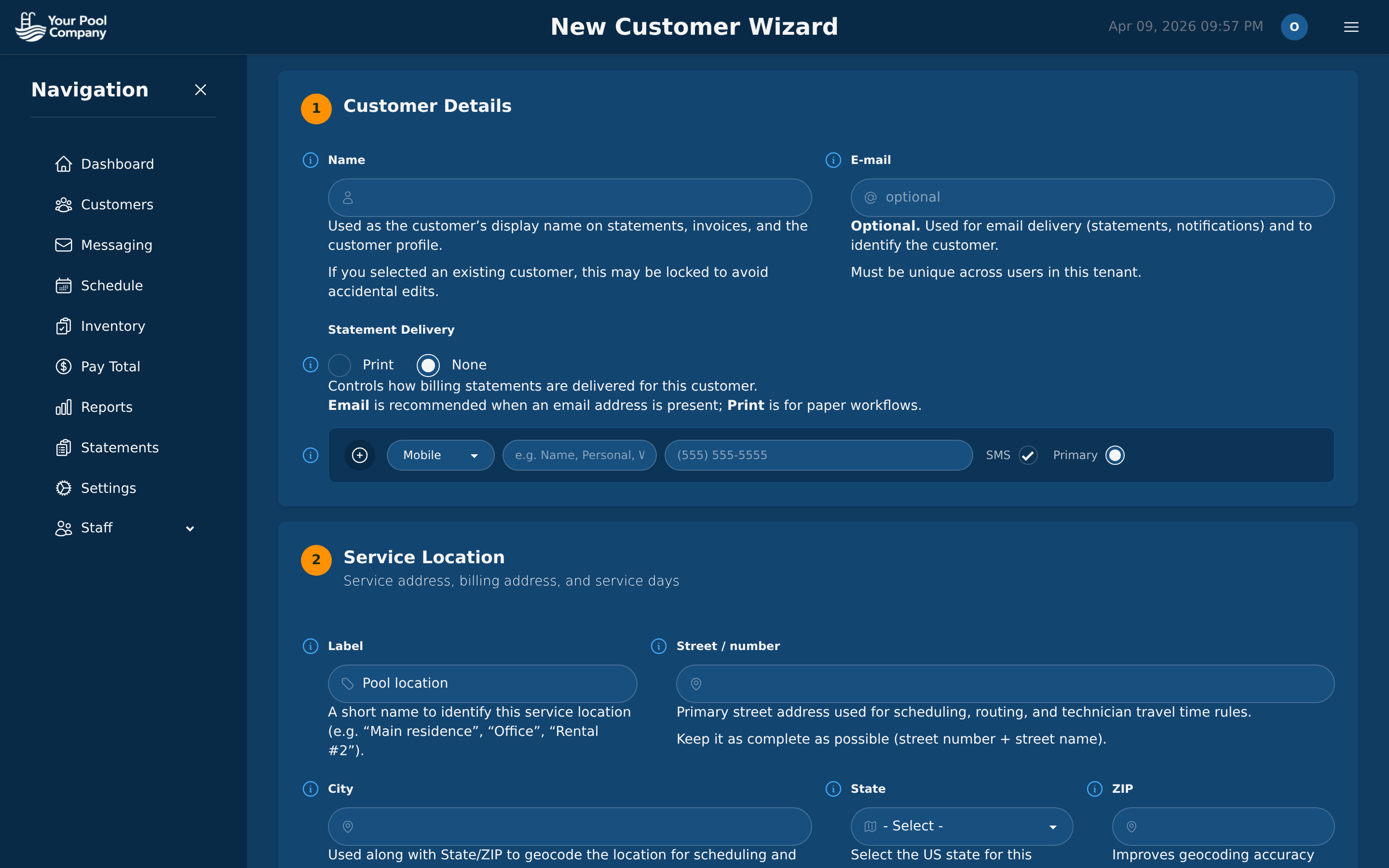 The subscription wizard walks you through setting up recurring billing for a new customer in under a minute.
What Happens on Each Billing Cycle
A well-run billing cycle follows the same basic sequence every time. The software generates the charge for the subscription amount. If AutoPay is enabled, it attempts the payment automatically through the customer’s saved card or bank account. After that, a receipt goes out by email, the payment is recorded in the customer’s billing history, and any failed payment is routed into the retry process.
That automation matters because it removes the need to manage every account by hand. It also creates a cleaner paper trail. When a customer asks what was billed and when it cleared, the office can see the full record without digging through old emails or separate spreadsheets.
Handling Mid-Cycle Changes
Pool service accounts change often. Customers travel, add services, request price changes, or cancel and return later. The billing system needs to keep up without creating confusion.
Proration matters when a customer starts mid-month, because the charge should reflect only the remaining days in the cycle. Pause and resume controls help when a customer goes away for vacation or temporarily stops service. Price changes should update the recurring amount inside the existing subscription instead of forcing a new setup. Cancellation should allow a reason and an effective date, and reactivation should restore the account with new billing dates if needed.
These controls keep the billing record accurate and prevent service disputes later. If the billing history clearly shows why a charge changed, the office spends less time explaining it.
Payment Methods: What to Accept
The easier you make it for customers to pay, the faster money reaches your account. Pool service companies usually need a mix of digital and offline payment methods because customers do not all pay the same way. The right software should support that mix without creating extra work for the office.
Credit and Debit Cards via Stripe
Cards are the most common option because they are simple for recurring billing. The customer stores the card once, and the software charges it automatically each cycle. Stripe supports the major card networks and works well for recurring payments.
Cards are fast and convenient, which makes them a strong fit for monthly service plans and AutoPay. The tradeoff is processing fees. Even so, many pool companies choose card payments because the convenience and speed outweigh the cost.
ACH and Bank Transfer
ACH is a good option for customers who prefer bank-to-bank payment or for larger recurring balances. Fees are usually lower than card processing, which can make a difference across a route with many repeat customers.
The tradeoff is timing. ACH can take several business days to settle, and failed payments can take longer to resolve. Still, it is a useful option when you want to reduce processing costs and offer customers another reliable way to pay.
PayPal
Some customers prefer PayPal because they already use it for other purchases and trust the platform. It can support recurring billing through PayPal Vault and gives customers another digital option without requiring a card on file.
The main downside is that the customer may leave your site to complete payment, which adds friction. Even so, it remains a useful choice for companies that want to offer more flexibility.
Offline Payments: Cash, Check, Zelle, and Cash App
Not every customer wants to pay digitally. Pool companies still deal with cash, checks, Zelle, and Cash App, and the billing system should record those payments accurately. That means logging the method, the reference number when applicable, and the payment date so the ledger stays clean.
Offline payments should not be treated as an afterthought. If the office has to track them in a separate notebook or spreadsheet, the records drift apart quickly. A good billing system brings those payments into the same history as card and ACH transactions, which makes reconciliation much easier.
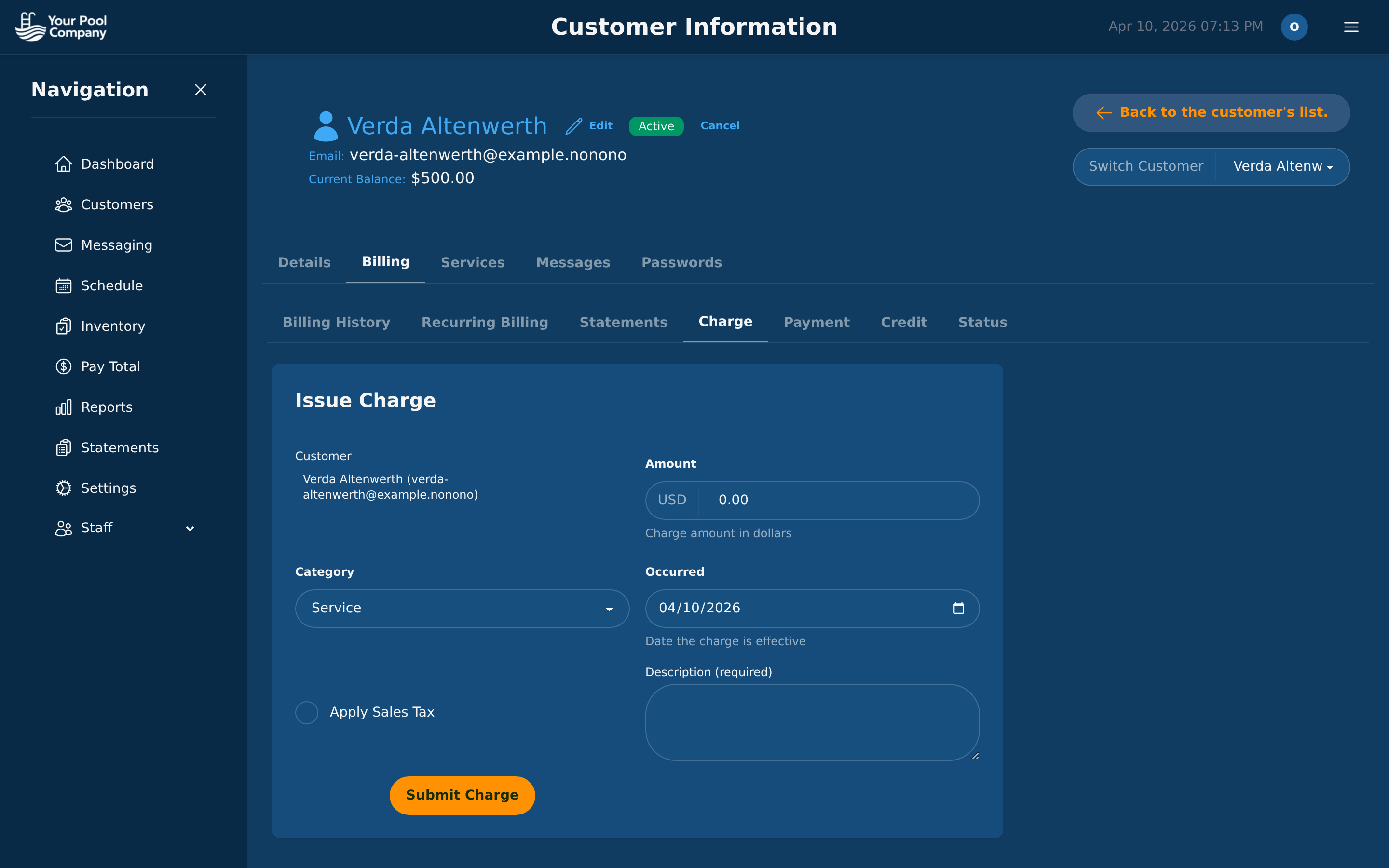 Record payments with the method, reference number, and date.
Statements vs. Invoices
Pool service companies usually rely on both statements and invoices, but they use them for different situations. The important thing is to know which document fits which kind of charge and to have software that can produce both without manual cleanup.
Monthly Statements
A monthly statement summarizes all charges, payments, and credits in a billing period. It shows the opening balance, the line items, and the closing balance. That format works well for recurring service customers who receive regular charges and do not need a separate invoice for every visit.
Statements are especially useful for autopay customers. They get one clear document that shows what was charged and what was paid. That reduces confusion and keeps communication simple.
Individual Invoices
Invoices work better for one-time work such as repairs, equipment installs, or other non-recurring jobs. In those cases, the customer often wants a specific document tied to a single service event and a specific amount.
That makes invoices the right choice when the job needs approval, when the price is unique, or when the charge sits outside the normal recurring subscription. A pool company should not force every repair into a monthly statement if a standalone invoice is the cleaner record.
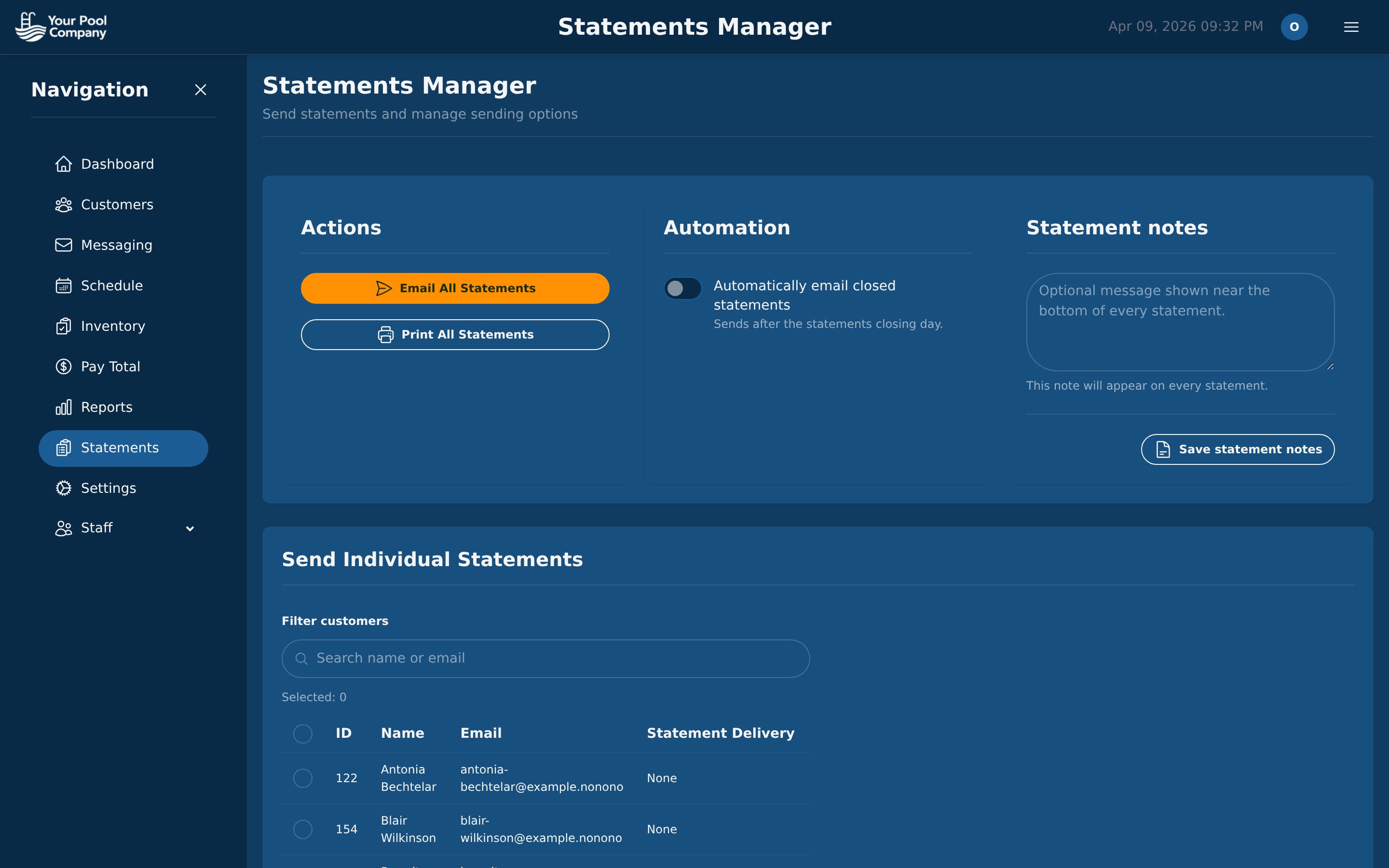 Send statements in bulk via email, print them, or set up automatic delivery after each billing cycle.
The key is automation. Most pool service teams cannot afford to build hundreds of statements by hand every month. The software should generate them in bulk, distribute them on schedule, and keep them attached to the customer record.
Handling Late Payments
Late payments hit cash flow hard in pool service because the business keeps serving customers while waiting for money that should already be collected. The best defense is a billing system that prevents lateness where possible and gives the office a clear recovery process when a payment fails.
AutoPay Is Your Best Friend
AutoPay is the simplest way to reduce late payments. When the card or bank account is charged automatically, there is nothing for the customer to remember and nothing for the office to chase. That does not eliminate every problem, but it removes the most common cause of late payment: inaction.
For recurring service businesses, AutoPay does more than save time. It stabilizes cash flow. It also reduces the awkward follow-up calls that come with overdue balances.
Automated Late Fees
Late fees should be set up as rules, not handled case by case. The software should let you define the grace period, the fee amount, and the trigger for applying it. Once a payment passes the grace period, the system adds the fee automatically.
That keeps enforcement consistent. Customers see the same policy every time, and the office does not have to decide whether to apply a fee manually on each account. Consistency matters because billing problems often come from inconsistency, not from the fee itself.
Failed Payment Recovery
When a card declines, the billing system should not stop at one failed attempt. It should retry automatically, notify the customer, alert the office, and, when configured, pause the subscription so charges do not keep bouncing on the same card.
A strong recovery process usually includes a sequence of retries, such as 3 days later, then 7 days later, then 14 days later. The customer should receive instructions to update the payment method. The office should know when retries have been exhausted so someone can follow up directly. If the subscription is paused, the account stays protected from repeated failed charges until the payment method is corrected.
Credits and Adjustments
Credits are part of clean billing, too. Sometimes a service was not completed, a charge was incorrect, or the company wants to offer goodwill after a complaint. The software should record the credit amount, the reason, who issued it, and how it affects the balance.
That history matters. When credits are documented inside the billing system, the office can explain the account clearly and the customer can see why the balance changed. It also helps keep the next statement accurate instead of burying the adjustment in a separate note.
What to Look for in Pool Service Billing Software
Not all billing software is built for pool companies. The right platform should match the way service routes, recurring subscriptions, and field work actually operate. If it only handles simple invoicing, it will create extra work instead of removing it.
Must-Have Features
The essentials start with recurring billing. The software should support flexible cycles, not just monthly billing, because pool companies often bill by route or by service schedule. It also needs multiple payment gateways, with Stripe, PayPal, and ACH at minimum, so customers can pay the way they prefer.
AutoPay with failed payment retry is another must-have because it reduces late payments and keeps cash flowing. The platform should support both statements and invoices, since pool businesses need each one for different situations. Late fee automation keeps policies consistent, while a customer portal lets customers view balances and pay without calling the office.
Mobile access matters because billing does not always happen at a desk. The office should be able to manage accounts from a phone when needed. QuickBooks integration is also essential so invoices and payments sync into accounting without duplicate data entry.
Nice-to-Have Features
Some features are not essential on day one, but they make the system more useful as the business grows. Proration helps when customers start in the middle of a cycle. Pause and resume tools preserve history while handling seasonal service changes. Batch operations save time when the office needs to generate statements for the whole route at once.
Tax handling matters when service areas cross jurisdictions or when certain charges need different tax treatment. Credit and debit tracking with reason codes also helps with reporting and account clarity. These features do not replace the core billing tools, but they make the system easier to run at scale.
What to Avoid
Generic invoicing tools look convenient at first, but they break down when recurring service, route management, and payment tracking become routine. Software that charges per invoice can also become expensive for pool companies that send out large volumes of recurring statements.
Avoid platforms without a customer portal, because customers will call or email the office for balances they should be able to see themselves. Avoid systems that do not connect billing to routing or scheduling, because billing should reflect the work completed in the field. If the service record and the billing record live in separate places, the office has to reconcile them manually.
How EZ Pool Biller Handles Billing
EZ Pool Biller is built specifically for pool service companies, and billing is part of a complete pool service management software system. That means the billing tools connect to subscriptions, payments, statements, customer communication, reporting, payroll, QuickBooks integration, routing, chemical tracking, the mobile app, and the customer portal instead of sitting on their own.
Here is how the billing side works in practice:
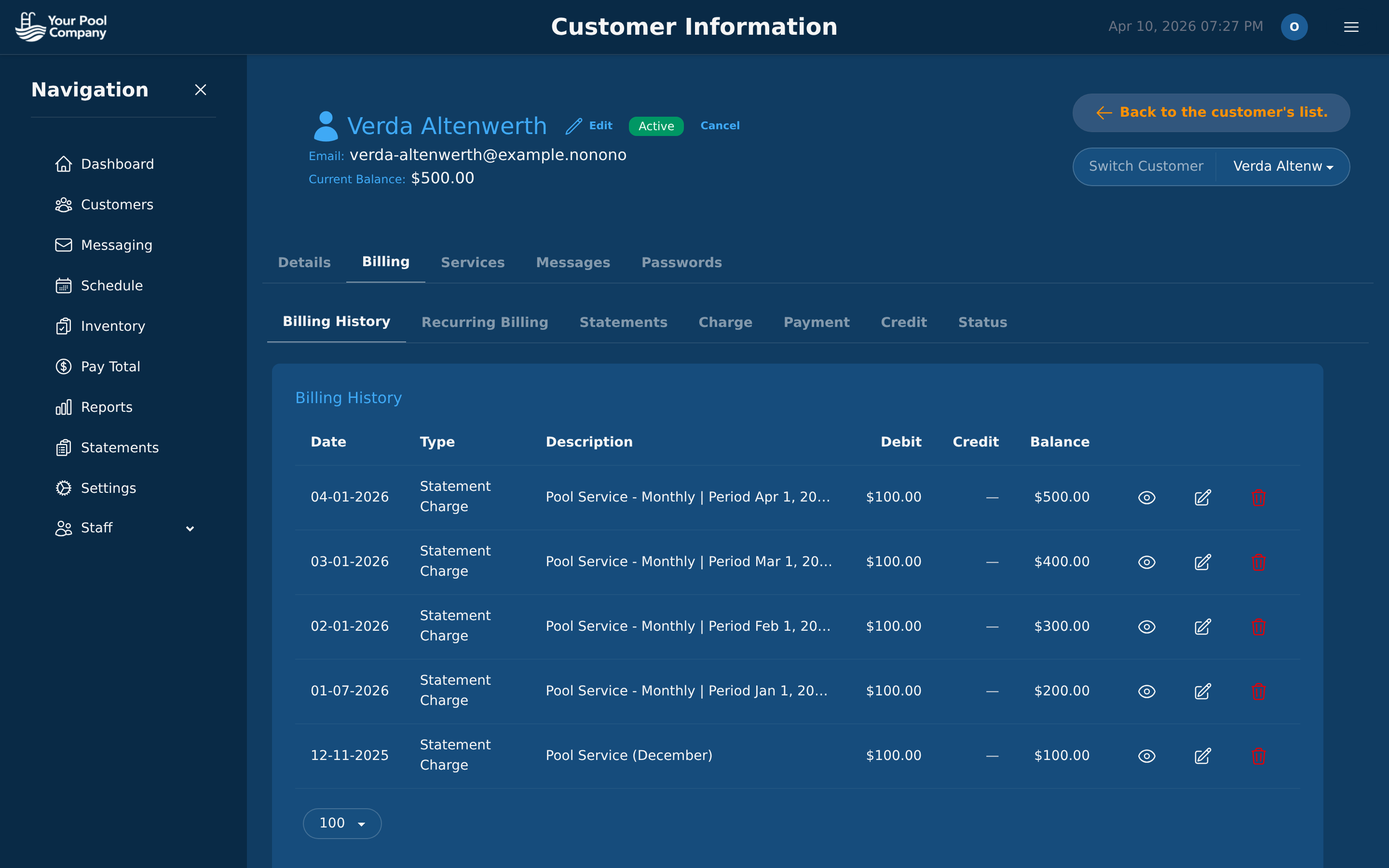
- Subscription setup wizard — set up a new customer with billing in under a minute
- 7 billing tabs per customer — billing history, recurring billing, statements, charges, payments, credits, and subscription status
- Accept Stripe, PayPal, ACH, and offline — all gateways active simultaneously
- AutoPay with automatic retry — failed payments retry on your schedule, customers get notified
- Statements with PDF generation — email or print in bulk
- Late fees — configurable amount, grace period, auto-application
- Subscription control — pause now, schedule pause, cancel with reason, reactivate with new dates
- Customer portal — customers view invoices, check balances, and pay online 24/7
- QuickBooks sync — one-way export of customers, invoices, and payments
This setup keeps the billing process tied to the rest of the business instead of isolating it in a separate tool. When service changes, the billing record changes with it.
All included for $35/month for 60 locations. Compare that to Skimmer at $98/month.
See the full billing feature breakdown →
Getting Started
Switching from manual billing does not have to be disruptive. The process should be straightforward if the software is designed for pool service companies.
- Sign up — create your account; no credit card is required for the trial
- Import your customers — transfer your data from your current system for free
- Set up subscriptions — use the wizard to create recurring billing for each customer
- Connect a payment gateway — Stripe, PayPal, or both
- Enable AutoPay — encourage customers to enroll through the portal
- Send your first statements — generate and email them in bulk
Once the customer data is in place, the transition is quick. The billing structure is set once, then the system carries the recurring work forward. Start your free trial →
Frequently Asked Questions
Why do pool companies need specialized billing software instead of a generic invoicing app? Pool companies need billing software that matches recurring routes, customer-specific pricing, and service changes that happen in the field. Generic invoicing tools can handle basic transactions, but they are not built for route-based billing, technician tracking, chemical usage, or subscription management. If your billing has to reflect weekly, biweekly, or monthly service plus repairs and seasonal pauses, specialized software saves time and reduces manual corrections.
What kinds of billing situations make pool service invoicing more complicated? Recurring service schedules are only part of it. You may bill one customer weekly, another every other week, and another for a repair on top of regular cleaning, while also adjusting for pauses, add-ons, or resumed service after travel. That means your system has to handle changing service levels and customer-specific charges without forcing you to rebuild each invoice manually.
How should a pool billing system handle seasonal changes and paused service? It should let you pause, resume, or adjust service without starting over on the account. A customer may travel, reduce service during a slower period, or add a filter clean during heavy use, so the billing system has to update charges and schedules cleanly. That flexibility keeps billing aligned with what actually happened in the field.
What customer communications should be automated in pool service billing? Statements, receipts, and payment reminders should go out automatically whenever possible. That reduces the need for someone to prepare each message by hand after hours and helps keep customers informed on schedule. A good billing system should make communication part of the workflow, not an extra manual task.